Assistive Technology Innovations Changing Lives: Tools for Greater Independence and Inclusion
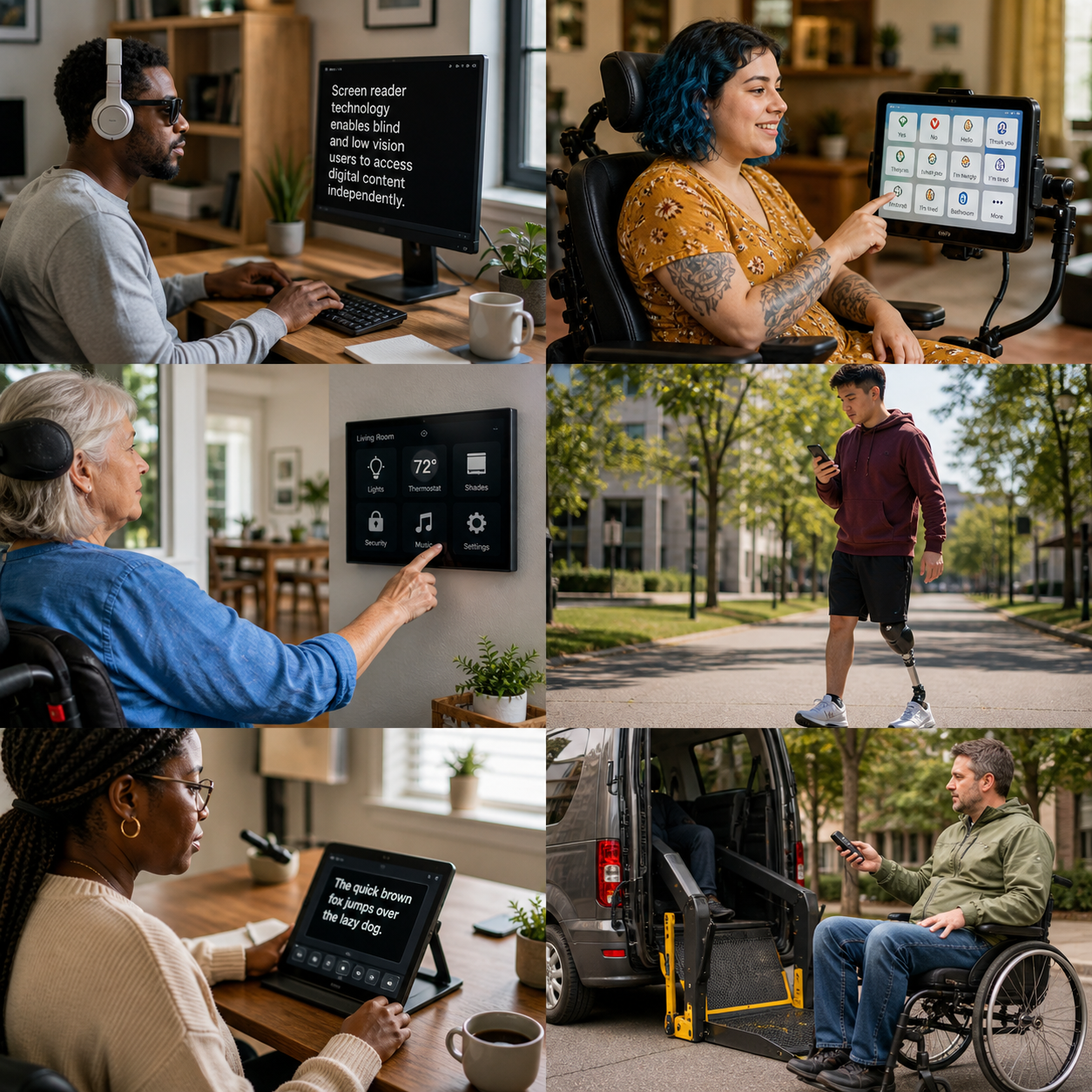
Assistive technology innovations are changing how disabled people communicate, move through the world, learn, work, and make everyday choices. These tools range from a low-tech pencil grip or ramp to sophisticated augmentative and alternative communication systems, wearable sensors, speech recognition software, and smart home technology.
The purpose is not to fix a person or make them conform to an inaccessible environment. The purpose is self-determination, equal access, and participation. Technology works best when disabled people help define the problem, choose the solution, and retain control over how it fits into their lives.
What assistive technology means—and why it matters
Assistive technology is any device, software, equipment, or product system used to maintain or improve a person’s functioning and independence. It matters because access to communication, information, transportation, education, employment, and healthcare is closely connected to autonomy and disability rights.
Assistive technology can support people with physical, sensory, cognitive, intellectual, developmental, and communication disabilities. It may also help people with temporary impairments, chronic illness, or changing access needs. A magnifier, adapted keyboard, hearing device, wheelchair, text-to-speech app, and electronic reminder system all belong to the broad assistive technology field.
One useful way to evaluate a tool is the goal-person-environment fit:
- Goal: What does the person want to do, such as speak with family, attend class, cook safely, or travel independently?
- Person: Which abilities, preferences, identity, culture, fatigue patterns, and sensory needs should the tool respect?
- Environment: Will it work at home, school, work, in public spaces, and alongside other accessibility supports?
A device can be technically impressive and still be unsuitable if it is uncomfortable, difficult to repair, socially stigmatizing, or controlled by someone else. Assistive technology complements human support, personal assistance, reasonable accommodations, and accessible public policy; it cannot replace those rights and resources.
Innovations improving communication and access to information
Communication and information technologies help people express ideas, understand content, and interact with digital services. AAC, screen readers, captions, and speech recognition each address different barriers, and many people combine several tools.
Augmentative and alternative communication (AAC) includes unaided methods such as gestures and sign language, as well as aided systems such as picture boards, symbol-based apps, text-to-speech software, and dedicated speech-generating devices. Modern AAC can store frequently used phrases, predict words, switch between languages, and provide voice options that better reflect a user’s age and identity. The right system should support spontaneous communication rather than limit a person to preset requests.
Speech recognition converts spoken language into text or commands. It can help people who cannot use a standard keyboard, experience pain while typing, or need hands-free control. Accuracy varies with accents, background noise, speech differences, and microphone quality, so users may need custom vocabulary, alternative input, or manual correction.
Screen readers translate text and interface elements into synthesized speech or refreshable braille. Their usefulness depends partly on whether websites, documents, mobile apps, and operating systems use semantic headings, descriptive labels, keyboard access, and meaningful alternative text. Captions, transcripts, audio description, magnification, high-contrast settings, and text-to-speech tools extend access for people with sensory and learning differences.
Accessibility is strongest when built into mainstream products through universal design. A captioned video can support Deaf and hard-of-hearing viewers, people watching in a noisy place, and anyone learning a new language. Flexible design benefits many users without requiring them to disclose a disability.
Mobility, navigation, and everyday independence
Mobility aids and environmental controls can increase safety, choice, and control by helping people move, navigate, and manage tasks on their own terms. They are most effective when matched to real environments and daily routines.
Wheelchairs, walkers, canes, standing devices, transfer equipment, and powered mobility systems continue to evolve. Adjustable seating, pressure management, alternative controls, and power-assist options can reduce fatigue and support posture. However, equipment cannot compensate for broken sidewalks, inaccessible transit, narrow doorways, or discriminatory policies. Physical access remains essential.
Navigation tools may combine GPS, vibration, audio prompts, obstacle alerts, accessible transit information, and indoor mapping. These features can help a person plan a route or identify a building entrance, but location data may be incomplete and sensors can misread crowded or changing environments. Users should be able to verify information and choose how much data they share.
Smart home technology can connect lights, thermostats, locks, curtains, appliances, doorbells, and emergency alerts to switches, voice commands, mobile apps, or adaptive controls. Someone with limited reach might open a door through a switch; someone with low vision might use spoken status updates; someone managing fatigue might automate repetitive tasks.
The practical test is reliability. A smart lock that stops working during an internet outage may create risk, while a simple wired switch could remain dependable. Choosing automation for convenience means accepting setup, cybersecurity, subscription, and maintenance responsibilities.
Assistive technology in education and employment
Accessible education and workplace technology expands participation by giving people multiple ways to read, write, communicate, organize tasks, and demonstrate knowledge. The technology should support the person’s role rather than create a separate track with fewer opportunities.
Students may use audiobooks, accessible digital textbooks, note-taking software, adapted writing tools, communication devices, braille displays, captioned lessons, or visual schedules. Executive-function supports can include reminders, task breakdowns, timers, and calendar prompts. A learner may understand complex material fully while needing a different way to access or produce it.
At work, screen readers, dictation, alternative keyboards, ergonomic equipment, live captions, accessible collaboration platforms, and flexible scheduling can remove barriers. Remote-work tools may help people avoid inaccessible commuting or manage energy, but remote employment is not automatically accessible. Video calls, document formats, authentication systems, and informal communication channels must also work with assistive technology.
Good support begins with the job or learning outcome. Ask: What must the person accomplish? Which barriers appear in the current process? Can the environment be redesigned before adding specialized equipment? Universal design and individualized accommodations often work together. A well-structured document helps everyone, while a particular student may still need braille or an AAC device.
Wearables, AI, and emerging possibilities
Wearable technology, artificial intelligence, sensors, and robotics may offer new ways to monitor environments, predict support needs, translate communication, and control devices. Their value depends on accuracy, affordability, privacy, and genuine user control.
Wearable devices can provide vibration-based alerts, posture feedback, fall detection, heart-rate data, navigation cues, or environmental information. Sensors embedded in clothing or mobility equipment might identify pressure patterns or movement changes. Robotics may assist with reaching, transfers, rehabilitation exercises, or household tasks, although many systems remain expensive and require professional setup.
AI-powered tools can generate captions, describe images, summarize text, recognize objects, predict words, and personalize interfaces. These applications can reduce effort, yet they may misidentify speech, faces, objects, or disabled ways of moving. A wrong alert in a low-risk setting is inconvenient; a wrong medical or safety interpretation can be serious.
Before adopting an AI-enabled device, consider four questions:
- Can the user correct, override, or disable the system?
- What personal, biometric, location, or communication data does it collect?
- Who sees the data, how long is it stored, and can it be deleted?
- What happens when the battery, internet connection, algorithm, or vendor fails?
Innovation should increase agency, not create new surveillance. Disabled people must be involved in testing and governance, especially when technology makes decisions about safety, communication, employment, or healthcare.
Choosing technology based on the person, not just the product
The best assistive technology choice starts with an individual goal and real-world trial, not a product’s marketing claims. A structured assessment can prevent expensive purchases that do not fit the person, environment, or routine.
A practical decision checklist
- Define the outcome. Describe the activity in concrete terms: sending messages independently, reading workplace documents, preparing food, or reaching public transportation.
- List barriers and preferences. Include pain, fatigue, dexterity, vision, hearing, speech, cognition, sensory comfort, appearance, culture, and privacy preferences.
- Compare low-tech and high-tech options. A keyguard, printed visual schedule, lever handle, or manual switch may be more reliable than an app or connected device.
- Check compatibility. Confirm operating-system support, file formats, connectivity, charging, mounting, accessibility settings, and integration with existing AAC, mobility, or home systems.
- Arrange training and a trial. The person and their chosen supporters need time to learn, customize, and test the tool in actual settings.
- Plan maintenance and funding. Ask about repairs, replacement parts, warranties, technical support, batteries, subscriptions, and possible coverage through local programs or employers.
- Review consent and privacy. The user should understand data practices and decide who can access settings, records, or remote controls.
Occupational therapists, speech-language pathologists, rehabilitation professionals, teachers, disability advocates, and experienced users can contribute useful perspectives. Their advice should inform the decision, not override the disabled person’s preferences.
Barriers, disability justice, and the future of innovation
The future of assistive technology depends on affordability, accessible design, disability-led co-design, and enforceable inclusion. A breakthrough has limited value if people cannot obtain it, repair it, use it privately, or take it into public life.
Common barriers include high prices, long assessment processes, limited insurance or public funding, inaccessible online shops, scarce local support, proprietary systems, poor interoperability, and products designed without disabled users. Digital exclusion also affects people who lack reliable broadband, modern devices, technical confidence, or accessible customer service.
Stigma can be a practical barrier too. Some people avoid visible devices because employers, strangers, or service providers make assumptions about competence. Designers can respond with flexible forms, personal customization, and options that allow users to decide when and how a tool is visible. Society must also challenge the prejudice that makes access technology feel socially risky.
Disability justice broadens the conversation beyond individual products. It asks who receives investment, whose communication is recognized, whose data is collected, and which communities are left out. Disabled people should participate as researchers, designers, testers, decision-makers, and leaders. Accessibility standards, such as those reflected in the Web Content Accessibility Guidelines, provide useful benchmarks, but lived experience reveals problems that checklists can miss.
The strongest innovations support choice across the whole access ecosystem: accessible buildings, inclusive education, flexible workplaces, reliable personal assistance, disability rights enforcement, and technology that works with all of them. Progress is measured by whether people can pursue their own goals with control, dignity, and meaningful participation.
Frequently asked questions
What is assistive technology?
Assistive technology is a device, software program, equipment, or product system that helps a person maintain or improve functioning, access, communication, independence, or participation. It includes both simple adaptations and advanced digital systems.
Which assistive technologies support communication?
AAC devices, speech-generating apps, picture boards, symbol systems, text-to-speech tools, sign-language technologies, captions, transcription, and speech recognition can support communication. The suitable option depends on the person’s language, motor, sensory, and environmental needs.
How can assistive technology improve independence?
It can reduce barriers to communication, mobility, reading, work, education, personal care, household control, and community participation. Independence may mean completing a task alone, directing support, or making a choice without relying on inaccessible systems.
What should people consider before choosing an assistive device?
Consider the person’s goal, comfort, usability, environment, compatibility, training, maintenance, cost, privacy, reliability, and access to repairs. A trial with trusted professional and peer input is often more useful than comparing specifications alone.
How can technology be designed more inclusively?
Designers can involve disabled people from the earliest research stage, follow accessibility standards, test with varied users, offer customization, protect privacy, support interoperability, and provide affordable repair and training. Disability-led participation should continue after launch, not end with a one-time consultation.